GTA 6 (Grand Theft Auto 6)GTA 6 : liste complète des commandes PS5 et Xbox
Retrouvez le mapping complet des boutons de GTA 6 sur PS5 et Xbox, pour chaque situation : à pied, en visée, en véhicule, en avion, à vélo, en nage et en parachute.
Voici la liste complète des commandes de GTA 6 sur PS5 et Xbox. Le jeu propose trois schemes de contrôle (Default, Classic et Left-Handed) que vous pouvez choisir dans les paramètres. Les tableaux ci-dessous détaillent les boutons pour chaque situation : à pied, en visée, au corps à corps, en véhicule terrestre ou maritime, en avion, à vélo, en nage et en parachute.
Les trois schemes de contrôle disponibles
Dans les paramètres, vous pouvez opter pour l'un des trois schemes suivants : Default, Classic ou Left-Handed. Chacun modifie la disposition des boutons pour s'adapter à votre style de jeu ou à votre main dominante.
Aperçu des commandes
Le menu de prévisualisation vous montre les commandes pour : à pied, en visée, au corps à corps, en véhicule terrestre ou maritime, en avion, à vélo, en nage et en parachute.
| PS5 | Xbox | Fonction |
|---|
 |  | Se déplacer |
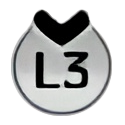 |  | Courir |
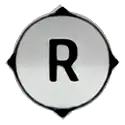 |  | Regarder |
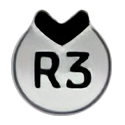 (maintenir) |  (maintenir) | Regarder derrière |
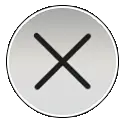 |  | Sauter / Grimper |
 |  | S'accroupir |
 |  | Corps à corps |
 |  | Interagir |
 (maintenir) |  (maintenir) | Viser / Interagir |
 |  | Tirer |
 | 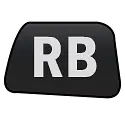 | Se couvrir |
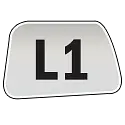 | 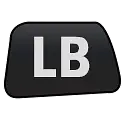 | Rengainer |
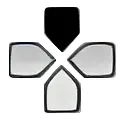 | 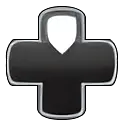 | Téléphone |
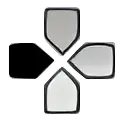 | 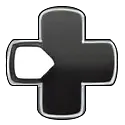 | Commandes radio |
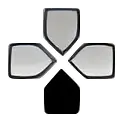 | 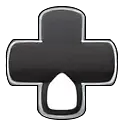 | Objectif / Mini-carte |
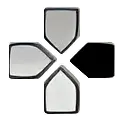 | 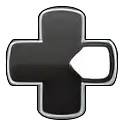 | Détoner les explosifs |
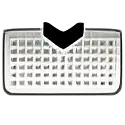 |  | Carte |
 |  | Pause |
Scheme Classic (à pied)
| PS5 | Xbox | Fonction |
|---|
| | Se déplacer |
| | S'accroupir |
| | Regarder |
| (maintenir) | (maintenir) | Regarder derrière |
| | Courir |
| | Corps à corps |
| | Sauter / Grimper |
| | Interagir |
| (maintenir) | (maintenir) | Viser / Interagir |
| | Tirer |
| | Se couvrir |
| | Rengainer |
| | Téléphone |
| | Commandes radio |
| | Objectif / Mini-carte |
| | Détoner les explosifs |
| | Carte |
| | Pause |
Scheme Left-Handed (à pied)
| PS5 | Xbox | Fonction |
|---|
| | Regarder |
| | Regarder derrière |
| | Se déplacer |
| (maintenir) | (maintenir) | Courir |
| | Sauter / Grimper |
| | S'accroupir |
| | Corps à corps |
| | Interagir |
| (maintenir) | (maintenir) | Viser / Interagir |
| | Tirer |
| | Rengainer |
| | Se couvrir |
| | Téléphone |
| | Commandes radio |
| | Objectif / Mini-carte |
| | Détoner les explosifs |
| | Carte |
| | Pause |
Commandes en visée (Aiming)
| PS5 | Xbox | Fonction |
|---|
| | Se déplacer |
| | Courir |
| | Regarder |
| | S'accroupir |
| | Corps à corps |
| | Changement rapide d'arme |
| (maintenir) | (maintenir) | Viser / Interagir |
| | Tirer |
| | Se couvrir |
| | Rengainer |
| | Zoom avant lunette |
| | Changer d'épaule |
| | Zoom arrière lunette |
| | Détoner les explosifs |
| | Carte |
| | Pause |
Scheme Classic (visée)
| PS5 | Xbox | Fonction |
|---|
| | Se déplacer |
| | S'accroupir |
| | Regarder |
| (maintenir) | (maintenir) | Zoom / Trajectoire de lancer |
| | Courir |
| | Corps à corps |
| | Sauter / Grimper |
| | Changement rapide d'arme |
| (maintenir) | (maintenir) | Viser / Interagir |
| | Tirer |
| | Se couvrir |
| | Rengainer |
| | Zoom avant lunette |
| | Changer d'épaule |
| | Zoom arrière lunette |
| | Détoner les explosifs |
| | Carte |
| | Pause |
Scheme Left-Handed (visée)
| PS5 | Xbox | Fonction |
|---|
| | Regarder |
| | Zoom / Trajectoire de lancer |
| | Se déplacer |
| (maintenir) | (maintenir) | Courir |
| | S'accroupir |
| | Corps à corps |
| | Changement rapide d'arme |
| (maintenir) | (maintenir) | Tirer |
| | Viser / Interagir |
| | Rengainer |
| | Se couvrir |
| | Zoom avant lunette |
| | Changer d'épaule |
| | Zoom arrière lunette |
| | Détoner les explosifs |
| | Carte |
| | Pause |
Commandes au corps à corps (Melee)
| PS5 | Xbox | Fonction |
|---|
| | Se déplacer |
| | Regarder |
| | Bloquer / Esquiver |
| | Coup de poing / Coup de pied |
| (maintenir) | (maintenir) | Verrouillage / Déplacement latéral |
| | Agripper |
| | Carte |
| | Pause |
Scheme Classic (corps à corps)
| PS5 | Xbox | Fonction |
|---|
| | Se déplacer |
| | Regarder |
| | Coup de poing / Coup de pied |
| | Bloquer / Esquiver |
| (maintenir) | (maintenir) | Verrouillage / Déplacement latéral |
| | Agripper |
| | Carte |
| | Pause |
Scheme Left-Handed (corps à corps)
| PS5 | Xbox | Fonction |
|---|
| | Regarder |
| | Se déplacer |
| | Bloquer / Esquiver |
| | Coup de poing / Coup de pied |
| (maintenir) | (maintenir) | Verrouillage / Déplacement latéral |
| | Agripper |
| | Carte |
| | Pause |
Commandes en véhicule terrestre ou maritime
| PS5 | Xbox | Fonction |
|---|
| | Tourner |
| | Klaxon / Nitro |
| | Regarder |
| (maintenir) | (maintenir) | Regarder derrière |
| | Frein à main |
| | Phares |
| | Corps à corps |
| | Sortir du véhicule |
| (maintenir) | (maintenir) | Freiner / Reculer |
| | Accélérer |
| | Tirer |
| | Rengainer |
| | Téléphone |
| | Clignotant gauche |
| | Objectif / Mini-carte |
| | Clignotant droit |
| | Carte |
| | Pause |
Scheme Classic (véhicule)
| PS5 | Xbox | Fonction |
|---|
| | Tourner |
| | Klaxon / Nitro |
| | Regarder |
| (maintenir) | (maintenir) | Regarder derrière |
| | Frein à main |
| | Corps à corps |
| | Phares |
| | Sortir du véhicule |
| (maintenir) | (maintenir) | Freiner / Reculer |
| | Accélérer |
| | Tirer |
| | Rengainer |
| | Téléphone |
| | Clignotant gauche |
| | Objectif / Mini-carte |
| | Clignotant droit |
| | Carte |
| | Pause |
Scheme Left-Handed (véhicule)
| PS5 | Xbox | Fonction |
|---|
| | Regarder |
| (maintenir) | (maintenir) | Regarder derrière |
| | Tourner |
| | Klaxon / Nitro |
| | Frein à main |
| | Phares |
| | Corps à corps |
| | Sortir du véhicule |
| (maintenir) | (maintenir) | Accélérer |
| | Freiner / Reculer |
| | Rengainer |
| | Tirer |
| | Téléphone |
| | Clignotant gauche |
| | Objectif / Mini-carte |
| | Clignotant droit |
| | Carte |
| | Pause |
Commandes en avion
| PS5 | Xbox | Fonction |
|---|
| | Tangage / Roulis |
| | Train d'atterrissage |
| | Regarder |
| (maintenir) | (maintenir) | Regarder derrière |
| | Lacet à droite |
| | Lacet à gauche |
| | Sortir du véhicule |
| (maintenir) | (maintenir) | Réduire les gaz |
| | Augmenter les gaz |
| | Tirer |
| | Rengainer |
| | Téléphone |
| | Commandes radio |
| | Objectif / Mini-carte |
| (maintenir) | (maintenir) | Menu partenaire |
| | Carte |
| | Pause |
Scheme Classic (avion)
| PS5 | Xbox | Fonction |
|---|
| | Tangage / Roulis |
| | Train d'atterrissage |
| | Regarder |
| (maintenir) | (maintenir) | Regarder derrière |
| | Lacet à droite |
| | Lacet à gauche |
| | Sortir du véhicule |
| (maintenir) | (maintenir) | Réduire les gaz |
| | Augmenter les gaz |
| | Tirer |
| (maintenir) | (maintenir) | Équipement |
| | Téléphone |
| | Commandes radio |
| | Objectif / Mini-carte |
| | Menu partenaire |
| | Carte |
| | Pause |
Scheme Left-Handed (avion)
| PS5 | Xbox | Fonction |
|---|
| | Regarder |
| (maintenir) | (maintenir) | Regarder derrière |
| | Tangage / Roulis |
| | Train d'atterrissage |
| | Lacet à droite |
| | Lacet à gauche |
| | Sortir du véhicule |
| (maintenir) | (maintenir) | Augmenter les gaz |
| | Réduire les gaz |
| | Rengainer |
| | Tirer |
| | Téléphone |
| | Commandes radio |
| | Objectif / Mini-carte |
| (maintenir) | (maintenir) | Menu partenaire |
| | Carte |
| | Pause |
Commandes à vélo
| PS5 | Xbox | Fonction |
|---|
| | Tourner / Se pencher |
| | Sonnette |
| | Regarder |
| (maintenir) | (maintenir) | Regarder derrière |
| | Sprint |
| | Bunnyhop |
| | Corps à corps |
| | Descendre |
| (maintenir) | (maintenir) | Freiner / Reculer |
| | Pédaler / Avancer |
| | Tirer |
| | Rengainer |
| | Téléphone |
| | Objectif / Mini-carte |
| (maintenir) | (maintenir) | Menu partenaire |
| | Carte |
| | Pause |
Scheme Classic (vélo)
| PS5 | Xbox | Fonction |
|---|
| | Tourner / Se pencher |
| | Sonnette |
| | Regarder |
| (maintenir) | (maintenir) | Regarder derrière |
| | Pédaler / Sprint |
| | Corps à corps |
| | Bunnyhop |
| | Descendre |
| (maintenir) | (maintenir) | Frein arrière / Reculer |
| | Frein avant |
| | Tirer |
| | Rengainer |
| (maintenir) | (maintenir) | Interagir |
| | Objectif / Mini-carte |
| (maintenir) | (maintenir) | Menu partenaire |
| | Carte |
| | Pause |
Scheme Left-Handed (vélo)
| PS5 | Xbox | Fonction |
|---|
| | Regarder |
| (maintenir) | (maintenir) | Regarder derrière |
| | Tourner / Se pencher |
| (maintenir) | (maintenir) | Sprint |
| | Sonnette |
| | Bunnyhop |
| | Corps à corps |
| | Descendre |
| (maintenir) | (maintenir) | Pédaler / Avancer |
| | Freiner / Reculer |
| | Rengainer |
| | Tirer |
| (maintenir) | (maintenir) | Interagir |
| | Objectif / Mini-carte |
| (maintenir) | (maintenir) | Menu partenaire |
| | Carte |
| | Pause |
Commandes en nage
| PS5 | Xbox | Fonction |
|---|
| | Se déplacer |
| | Nager plus vite |
| | Regarder |
| (maintenir) | (maintenir) | Regarder derrière |
| | Remonter à la surface |
| | Corps à corps |
| (maintenir) | (maintenir) | Viser / Déplacement latéral |
| | Tirer |
| | Plonger |
| | Rengainer |
| | Commandes radio |
| | Objectif / Mini-carte |
| (maintenir) | (maintenir) | Menu partenaire |
| | Carte |
| | Pause |
Scheme Classic (nage)
| PS5 | Xbox | Fonction |
|---|
| | Se déplacer |
| | Regarder |
| (maintenir) | (maintenir) | Regarder derrière |
| | Nager plus vite |
| | Corps à corps |
| | Remonter à la surface |
| (maintenir) | (maintenir) | Viser / Déplacement latéral |
| | Tirer |
| | Plonger |
| | Rengainer |
| | Commandes radio |
| | Objectif / Mini-carte |
| (maintenir) | (maintenir) | Menu partenaire |
| | Carte |
| | Pause |
Scheme Left-Handed (nage)
| PS5 | Xbox | Fonction |
|---|
| | Regarder |
| | Regarder derrière |
| | Se déplacer |
| (maintenir) | (maintenir) | Nager plus vite |
| | Remonter à la surface |
| | Corps à corps |
| (maintenir) | (maintenir) | Tirer |
| | Viser / Déplacement latéral |
| | Rengainer |
| | Plonger |
| (maintenir) | (maintenir) | Menu radio |
| | Objectif / Mini-carte |
| (maintenir) | (maintenir) | Menu partenaire |
| | Carte |
| | Pause |
Commandes en parachute
| PS5 | Xbox | Fonction |
|---|
| | Tourner |
| | Regarder |
| (maintenir) | (maintenir) | Regarder derrière |
| | Ouvrir le parachute |
| | Détacher le parachute |
| (maintenir) | (maintenir) | Freiner à gauche |
| | Freiner à droite |
| | Tirer |
| | Rengainer |
| | Téléphone |
| | Commandes radio |
| | Objectif / Mini-carte |
| (maintenir) | (maintenir) | Menu partenaire |
| | Carte |
| | Pause |
Scheme Classic (parachute)
| PS5 | Xbox | Fonction |
|---|
| | Tourner |
| | Regarder |
| (maintenir) | (maintenir) | Regarder derrière |
| | Ouvrir le parachute |
| | Détacher le parachute |
| (maintenir) | (maintenir) | Freiner à gauche |
| | Freiner à droite |
| | Tirer |
| | Rengainer |
| | Téléphone |
| | Commandes radio |
| | Objectif / Mini-carte |
| (maintenir) | (maintenir) | Menu partenaire |
| | Carte |
| | Pause |
Scheme Left-Handed (parachute)
| PS5 | Xbox | Fonction |
|---|
| | Regarder |
| | Tourner |
| (maintenir) |  (maintenir) | Regarder derrière |
| | Ouvrir le parachute |
| | Détacher le parachute |
| (maintenir) | (maintenir) | Freiner à droite |
| | Freiner à gauche |
| | Rengainer |
| | Tirer |
| | Téléphone |
| | Commandes radio |
| | Objectif / Mini-carte |
| (maintenir) | (maintenir) | Menu partenaire |
| | Carte |
| | Pause |
Changer de scheme dans les paramètres
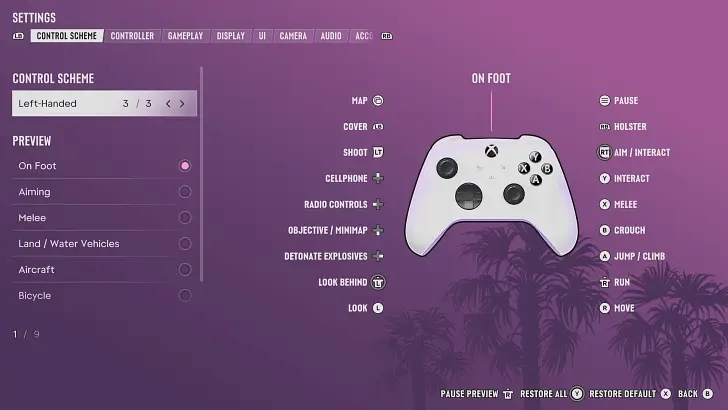
Vous pouvez modifier le mapping des boutons dans Control Scheme (Scheme de contrôle) dans les paramètres. Vous y verrez aussi un aperçu de toutes les commandes lorsque vous êtes à pied, en visée, en véhicule, en nage ou en parachute.
Vous pouvez également ajuster la sensibilité de visée et de regard et activer les contrôles inversés pour rendre l'expérience aussi naturelle que possible.